TSA color token

TSA color token

TSA color token

CONTEXT

CONTEXT

A part of the product, No color tokens

A part of the product, No color tokens

A part of the product, No color tokens

The Sarz Academy is a music education platform built for four user types (students, instructors, mentors and admins) which spans 200+ screens

The product needed to move quickly, so I made a pragmatic call to move fast, build screens, get the design done. I put together a handful of core components (buttons, inputs) and few base color styles just enough to keep moving consistently.

I deliberately started with Styles rather than Variables. No Colour tokens existed.

By the time the design was complete, colour was consistently applied across the product. But the system lacked the structure needed to scale: there was no primitive layer, no semantic naming, and no clear separation between what a colour is and what it means in context.

APPROACH

APPROACH

Auditing the product before token definition

Auditing the product before token definition

Auditing the product before token definition

I did a reverse color audit using AI to do what would have taken days manually . The entire design was audited and i retrofitted a colour token system from what already existed.

I used Claude with a connected Figma MCP to audit the actual design file. i audited the four portals separately to understand how colour was actually being used across the product . The audit surfaced every unique fill, opacity variant, and frequency of use, allowing me to consolidate near-duplicates and identify the colour roles the system needed.

Before asking the AI to create variables directly in Figma, I had it generate a visual HTML artifact showing the colour styles and their usage. This gave me a visual checkpoint to review the proposed system and catch potential mistakes before building variables directly in the figma file and consuming unnecessary AI credits.

I did a reverse color audit using AI to do what would have taken days manually . The entire design was audited and i retrofitted a colour token system from what already existed.

I used Claude with a connected Figma MCP to audit the actual design file. i audited the four portals separately to understand how colour was actually being used across the product . The audit surfaced every unique fill, opacity variant, and frequency of use, allowing me to consolidate near-duplicates and identify the colour roles the system needed.

Before asking the AI to create variables directly in Figma, I had it generate a visual HTML artifact showing the colour styles and their usage. This gave me a visual checkpoint to review the proposed system and catch potential mistakes before building variables directly in the figma file and consuming unnecessary AI credits.

I did a reverse color audit using AI to do what would have taken days manually . The entire design was audited and i retrofitted a colour token system from what already existed.

I used Claude with a connected Figma MCP to audit the actual design file. i audited the four portals separately to understand how colour was actually being used across the product . The audit surfaced every unique fill, opacity variant, and frequency of use, allowing me to consolidate near-duplicates and identify the colour roles the system needed.

Before asking the AI to create variables directly in Figma, I had it generate a visual HTML artifact showing the colour styles and their usage. This gave me a visual checkpoint to review the proposed system and catch potential mistakes before building variables directly in the figma file and consuming unnecessary AI credits.

I did a reverse color audit using AI to do what would have taken days manually . The entire design was audited and i retrofitted a colour token system from what already existed.

I used Claude with a connected Figma MCP to audit the actual design file. i audited the four portals separately to understand how colour was actually being used across the product . The audit surfaced every unique fill, opacity variant, and frequency of use, allowing me to consolidate near-duplicates and identify the colour roles the system needed.

Before asking the AI to create variables directly in Figma, I had it generate a visual HTML artifact showing the colour styles and their usage. This gave me a visual checkpoint to review the proposed system and catch potential mistakes before building variables directly in the figma file and consuming unnecessary AI credits.

HTML color usage artifact

RESULT

RESULT

Building variables with AI inside figma

Building variables with AI inside figma

Building variables with AI inside figma

Once I validated the proposed token structure, I used the Figma MCP to have Claude build the system directly in Figma, creating 27 primitive variable and 30 semantic tokens, correctly aliased and documented with usage descriptions.

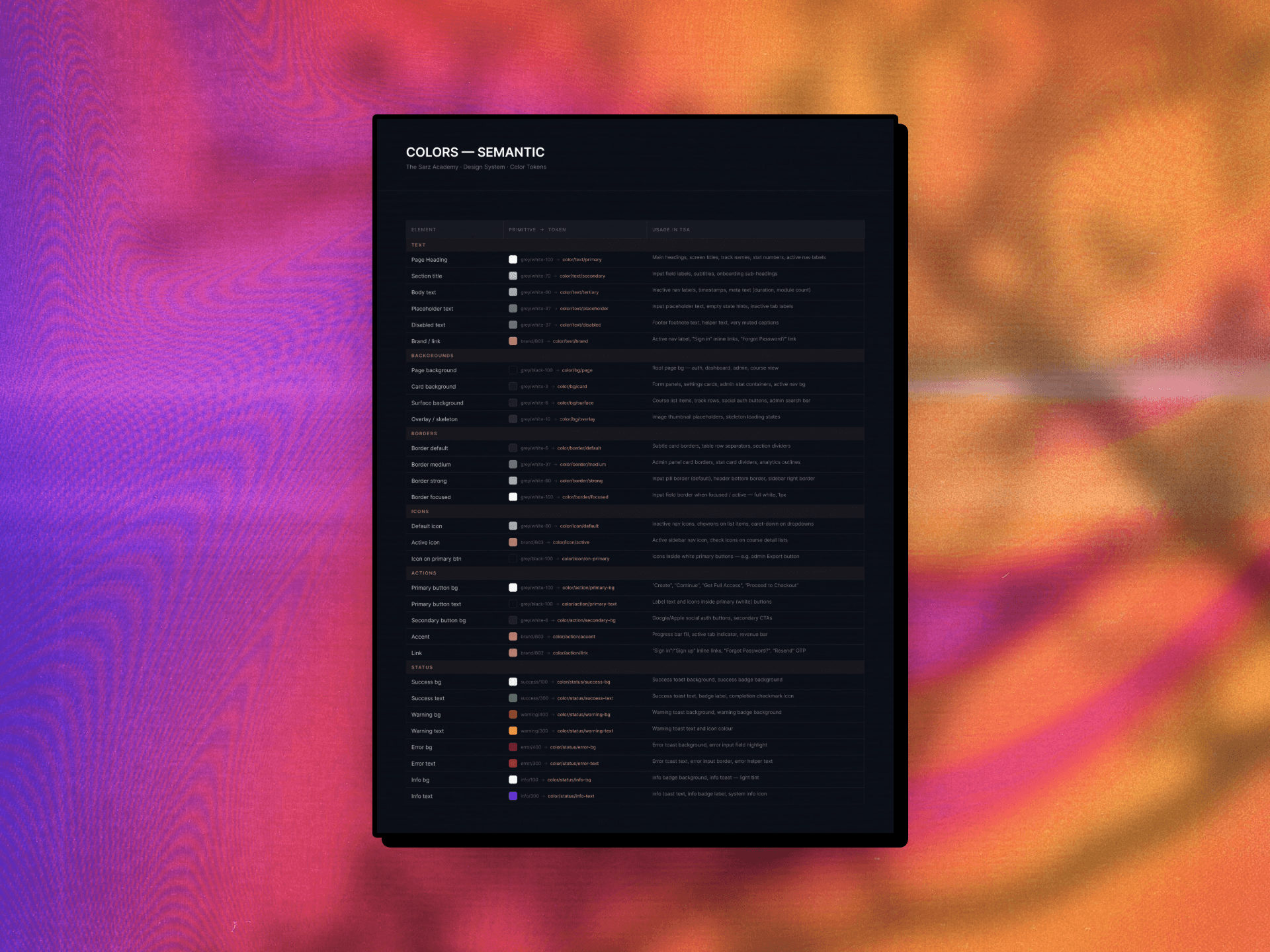
Claude also generated the colour reference table inside the Figma file, showing each semantic token, its primitive source, and where it is used across the product.

I then reviewed the generated system to ensure the aliases, naming, and usage matched the intended architecture.

Once I validated the proposed token structure, I used the Figma MCP to have Claude build the system directly in Figma, creating 27 primitive variable and 30 semantic tokens, correctly aliased and documented with usage descriptions.

Claude also generated the colour reference table inside the Figma file, showing each semantic token, its primitive source, and where it is used across the product.

I then reviewed the generated system to ensure the aliases, naming, and usage matched the intended architecture.

Once I validated the proposed token structure, I used the Figma MCP to have Claude build the system directly in Figma , creating 27 primitive variable and 30 semantic tokens, correctly aliased and documented with usage descriptions.

Claude also generated the colour reference table inside the Figma file, showing each semantic token, its primitive source, and where it is used across the product.

I then reviewed the generated system to ensure the aliases, naming, and usage matched the intended architecture.

Once I validated the proposed token structure, I used the Figma MCP to have Claude build the system directly in Figma, creating 27 primitive variable and 30 semantic tokens, correctly aliased and documented with usage descriptions.

Claude also generated the colour reference table inside the Figma file, showing each semantic token, its primitive source, and where it is used across the product.

I then reviewed the generated system to ensure the aliases, naming, and usage matched the intended architecture.

Color variables built in figma with claude

REFLECTION

REFLECTION

What AI changed

What AI changed

What AI changed

This proved that leveraging AI can shrink a full day of tedious, repetitive clicking into seconds of execution.
However, the experience reinforced that automation is only as powerful as the strategic intent behind it. The AI can write the data, but still require a designer who deeply understands the product context.

LET'S GET IN TOUCH

Have a project idea? I am here to help!

OYEYINKA.

Create a free website with Framer, the website builder loved by startups, designers and agencies.